Spanish English Translator
- 4.4
- Rating
- 500.00K
- Installs
- Free
- Price
 Analysis by App-foxy
I tested Spanish English Translator as a practical education app rather than treating it like a full language course. My first impression was that it aims to solve a very specific problem: helping me understand or produce a quick Spanish-English translation without making me work through a large lesson system first. That narrow purpose is also its main appeal. When I need a phrase for a message, a sign, a menu, or a short conversation, a focused translator can be more useful than opening a broad language-learning platform.
This app is free to start, is made by San Seeen Developers, and has built a sizeable audience with over half a million installs. Its average score is 4.3 from roughly six hundred ratings, which suggests that many people find the basic translation workflow useful. I would describe it as a handy companion for everyday situations, not as a replacement for structured study, a professional interpreter, or careful human editing.
How the translator feels in real mobile situations
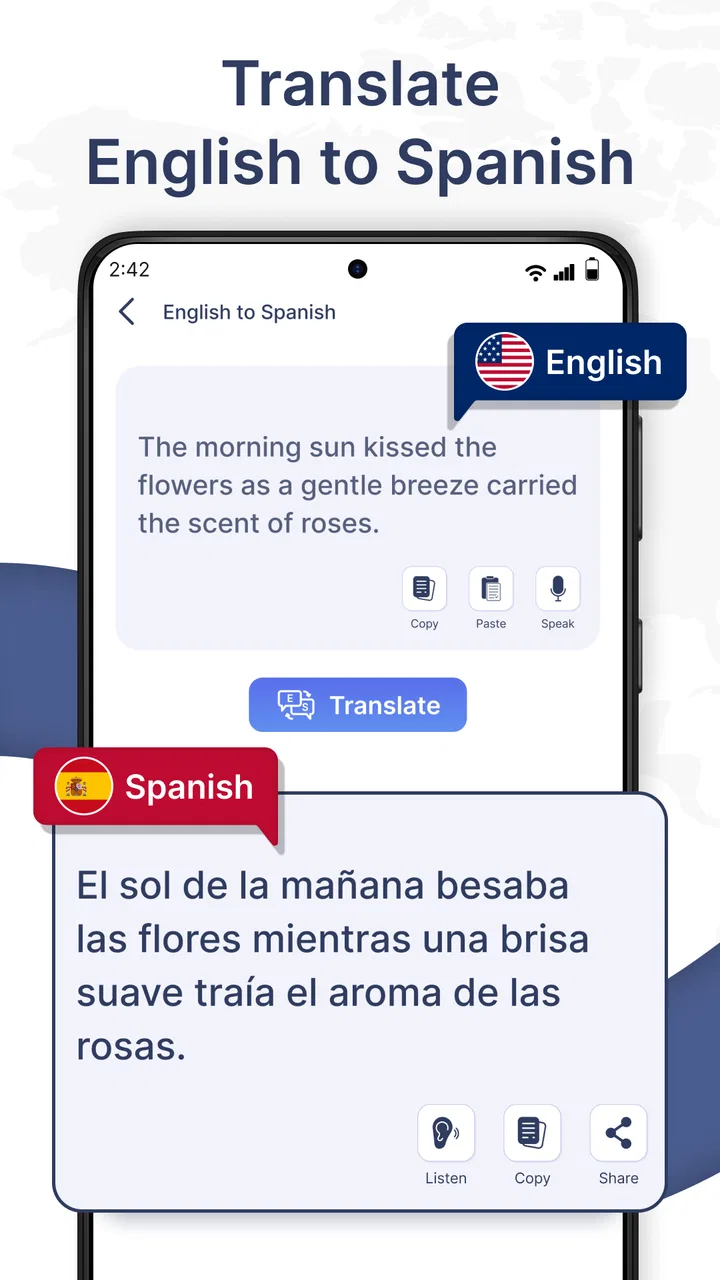
The best way to judge a translation app is to imagine using it when attention is limited. I picture arriving somewhere where Spanish is spoken, receiving a short message, or trying to understand a sentence before replying. In those moments, the value is not a long explanation of grammar. I want a direct result with as little friction as possible. Spanish English Translator is built around that expectation, and its store summary emphasizes fast, accurate, easy translation.
You May Also Like

 Blood Strike: 2.5 Anniversary
Blood Strike’s Loadouts Turn Every Drop Into a Tactical Gamble
A close look at Blood Strike’s custom loadouts: how fast access to signature weapons reshapes its battle royale rhythm, rewards preparation, and narrows the gap between fights.

 Pandora - Music & Podcasts
Pandora’s Music Is Easy to Start, but Harder to Recover
Pandora’s strength is its low-effort path from a seed to a station. Its weak spot is how much confidence it asks you to place in connection, setup, and quiet recovery.

 8 Ball Pool
 Is Built on Rivalries, Rematches, and Routine
A close look at the rivalries, rematches, shared routines, and unanswered safety questions that turn a quick pool match into a persistent mobile community.

 Samsung Music
’s Quiet Strength Is Playing What You Already Own
Its reach comes less from spectacle than from dependable access to a personal library. That simplicity is both the app’s strongest retention engine and its ceiling.

 AccuWeather: Weather Radar
AccuWeather Review: A Quick, Clear Forecast for Everyday Decisions
For everyday plans, the best forecast is the one you can understand quickly. AccuWeather makes rain timing, radar, and local conditions easy to act on, with a few trade-offs.

 Hill Climb Racing
Why Hill Climb Racing Still Turns Crashes Into One More Run
A tiny car, a bumpy hill and one more upgrade: Hill Climb Racing keeps resurfacing because its simple chaos makes every near-miss feel personal.
More From Our News Desk



That simplicity makes it suitable for learners, travelers, families communicating across languages, and anyone who regularly handles short Spanish or English text. It can also help a student check the general meaning of a sentence before looking up individual words. I found that this kind of two-stage workflow is more useful than copying a translation blindly: first use the app to understand the message, then inspect the wording and decide whether the result fits the situation.
A realistic example would be a traveler receiving a Spanish text from a host about a change to a meeting point. The person can enter the message, understand the broad instruction, and then translate a short reply back into Spanish. That is a good use case because speed matters, the language is conversational, and a small mistake can usually be corrected by asking for clarification. It is a much less suitable approach for a legal document, medical instruction, or formal business agreement where every nuance needs checking.
The important distinction is that a quick translation is not automatically a complete interpretation. Short phrases can have several natural meanings depending on region, tone, and context. I would use the result as a starting point, especially when the wording affects a decision or relationship. The app can remove a language barrier in a moment, but it cannot replace judgment about what the speaker really intends.
Connectivity changes the experience
Network access is an important part of the practical experience. Translation requests can feel effortless when the phone has a reliable connection, but the same task becomes less predictable in a weak-signal area. I would be especially careful in underground transport, remote roads, crowded venues, or buildings with poor reception. Those are exactly the places where a translator may be needed most, so connectivity should be considered before depending on it.
I would not plan a trip around the assumption that every translation will work without a connection. Instead, I would prepare important phrases before leaving, keep essential addresses and instructions visible in their original form, and avoid treating the app as the only source of information. This is not a criticism of its translation purpose; it is a sensible habit for any tool that may need to process a request while the phone is online.
There is also a difference between having a connection and having a good connection. A phone may show a signal while data is slow enough to make a quick exchange awkward. If I were standing at a counter or trying to answer someone in real time, I would keep my sentences short and avoid repeatedly submitting long blocks of text. That reduces waiting and makes it easier to spot whether the result matches the question.
For data-conscious use, I would favor short, purposeful entries instead of pasting an entire conversation. Besides being easier to review, smaller pieces help me identify which sentence caused confusion. I would also avoid entering sensitive personal information unless it is genuinely necessary. A translation app is most useful when it handles the language problem without becoming a place where I casually store private details.
Useful workflows beyond a single translation
One of the more useful ways to approach this app is as a checking tool rather than a one-tap answer machine. If I am learning Spanish, I can first write what I think a phrase means, translate it, and compare the result with my own understanding. That process exposes vocabulary gaps and helps me notice when a sentence sounds more formal, direct, or unusual than expected.
A second practical workflow is to break a long message into meaningful sections. Translating a paragraph all at once may produce a result that is difficult to evaluate. Working sentence by sentence lets me connect each output with the original and notice names, times, instructions, and negations. This is particularly helpful when a message contains several requests. It takes longer, but it gives me more control over the meaning.
A third useful habit is back-checking a reply. If I need to send something important in Spanish, I can translate my draft into English again and read the result as if someone else had written it. If the back-translation sounds harsher, vaguer, or more complicated than intended, I would simplify the original before sending it. This does not guarantee perfect wording, but it can catch obvious misunderstandings.
These workflows show where the app fits in the education category. It can support active learning when I use it to compare, revise, and question language. It becomes less educational when I simply paste every exercise into it and copy the answer. For a beginner, that difference matters: convenience is helpful, but understanding improves when the learner still makes an effort before checking.
What happens when a result is unclear
Translation quality is easiest to judge with simple, complete sentences. Slang, jokes, regional expressions, mixed-language messages, and sentences without clear context are harder. When a result looks strange, I would not immediately assume the app has failed. I would first remove unnecessary words, split the sentence, check spelling, and try a more direct version. This recovery process often tells me whether the problem came from the source text or from the translation itself.
Names and place references deserve extra care. A translator may treat an unusual name as an ordinary word, while a local expression may be rendered literally even though its intended meaning is figurative. If the result concerns travel directions, payment, an appointment, or a safety issue, I would confirm it with the other person rather than relying on one generated sentence.
There is a social recovery technique that works well with any translator: use the app to create a short clarification instead of attempting a complicated explanation. Phrases equivalent to “Do you mean this?” or “Can you repeat the time?” are often safer than a long response. In a live conversation, concise questions reduce the chance that a small translation error will grow into a larger misunderstanding.
Connectivity failures require a similar mindset. If a request does not complete, I would check the connection, retry with a shorter phrase, and keep the original text available. I would not repeatedly tap without checking whether a previous request has already gone through, especially when using mobile data. If the situation is urgent, another communication method or a person who knows the language is a better fallback than waiting for one app to recover.
Who will benefit most from this app?
I see the strongest fit among casual travelers, Spanish learners, bilingual households, and people who occasionally need to understand short messages. It is also useful for someone who wants a dedicated translation tool instead of navigating through a larger productivity or language-learning service. The free price makes it easy to try for occasional needs, while the Teen content rating places it in a range that suits many older students and general users.
Students can use it to check vocabulary, compare sentence structure, and prepare simple conversations. Travelers can use it for menus, directions, and basic questions, provided they maintain a backup plan for poor connectivity. Families may appreciate the quick exchange between English and Spanish, especially when the goal is understanding rather than perfect literary wording.
I would be more cautious about recommending it to professional translators, advanced students seeking detailed grammar instruction, or anyone who needs certified or publication-ready language. A dedicated dictionary may be better for definitions and usage examples, while a full language course is stronger for progression, listening practice, pronunciation, and long-term retention. For high-stakes writing, a fluent human reviewer remains the safer choice.
The in-app purchase price is listed as $2.99 per item. I would consider that before making it my main translation tool, particularly if I only need occasional help. Someone who uses it frequently may find an optional purchase worthwhile, but the decision depends on what each item provides and how often the app is used. I would test the free experience first rather than paying simply because I expect more convenience.
Version, device fit, and everyday practicality
The current version is 1.44, and the app runs on Android devices using version 6.0 or later. That broad minimum requirement means it can suit people who keep an older phone, although the smoothness of any translation session will still depend on the device, keyboard, and network connection. On a small screen, I would keep entries short and review the output carefully before showing it to someone else.
Because this is an education app rather than a full communication suite, I would judge it by how quickly it gets me from a phrase to an understandable result. I would not expect it to teach me why every grammatical choice was made. That limitation is not a problem for a traveler asking a basic question, but it matters to a learner who wants to build a reliable foundation.
Compared with manually searching a bilingual dictionary, the app is more convenient for complete sentences and immediate context. Compared with a broad language-learning app, it is more direct but less structured. Compared with asking a fluent speaker, it is available at the moment I need it but cannot respond to tone, local knowledge, or ambiguity in the same human way. Those trade-offs make its role clear: it is a fast bridge for everyday language, not an all-purpose language expert.
My final view on using it while connected or on the move
After looking at the app through real mobile situations, I think Spanish English Translator is worth trying if I want a straightforward Spanish-English aid for short, everyday exchanges. Its free entry point, focused purpose, and established user base make it approachable, and the 4.3 average indicates a generally positive reception. San Seeen Developers has kept the concept clear rather than turning it into something unrelated to translation.
My recommendation comes with one condition: treat connectivity and context as part of the tool. Use it when the phone can communicate reliably, enter manageable pieces of text, and check anything important before acting on it. Prepare key travel information separately, avoid sending sensitive details casually, and have another way to communicate when the network is unreliable.
I would choose this app for a quick message, a menu, a simple question, or a learning check. I would choose a dictionary for detailed word study, a course for sustained progress, and a human translator for high-stakes language. Within its narrower lane, it can be genuinely useful. My verdict is positive for practical, low-risk translation, provided I remain the final judge of meaning rather than accepting every output without thought.
FAQs for Spanish English Translator
01How accurate is the Spanish English Translator app?
The Spanish English Translator app boasts high accuracy due to its use of advanced algorithms and a comprehensive language database. However, like any translation tool, it may struggle with idiomatic expressions, slang, or complex sentences. For the best results, it's advisable to use the app for simple and common phrases and verify translations when dealing with important documents.
02Does the app work offline?
Yes, the Spanish English Translator app offers an offline mode, allowing users to access basic translation features without an internet connection. This is particularly useful for travelers in areas with limited connectivity. However, offline capabilities might be limited compared to online features, which provide more accurate and nuanced translations.
03Is the app free to use, or are there any hidden costs?
The Spanish English Translator app is free to download and offers basic translation features at no cost. However, it includes optional in-app purchases for premium features, such as advanced translations, ad removal, and additional language resources. Users should review these options to see if they meet their needs before making any purchases.
04Can the app translate voice and text?
Yes, the app supports both voice and text translations. Users can input text manually or use the voice recognition feature to speak directly into the app, which is particularly handy for quick translations on the go. The voice feature is designed to capture different accents and dialects for more accurate translations.
05How user-friendly is the Spanish English Translator app?
The app is designed with a user-friendly interface, making it easy for both beginners and advanced users to navigate. It includes features such as a clean layout, intuitive controls, and helpful tutorials. Additionally, frequent updates ensure that the app remains efficient and easy to use, incorporating user feedback into its design improvements.
Pros
- User-friendly interface
- easy to navigate.
- Accurate translations for everyday use.
- Supports voice input for convenience.
- Offline mode available for on-the-go use.
- Real-time translation feature is fast.
Cons
- Limited language pair options.
- Occasional inaccuracies with idioms.
- Requires internet for some features.
- Ad-supported
- can be distracting.
- No text-to-speech for translations.

Spanish English Translator
Gallery